


f you want to build a store that can grow with you, this BigCommerce dropshipping setup guide will get you from empty account to launch-ready in seven clear steps. BigCommerce is a powerful ecommerce platform built for stores that plan to scale, and it pairs nicely with dropshipping because you never hold inventory. You list products, a supplier ships them, and you keep the margin. We'll walk through account creation, store design, connecting suppliers, optimizing products, setting up payments, launching, and driving traffic, so you can start selling with confidence.
What Dropshipping on BigCommerce Involves
Let's start with the basics so the rest of the steps make sense. Dropshipping is a retail model where you never keep stock on hand. When a customer places an order, you pass it to a supplier who ships the product directly to the buyer.
You earn the difference between the retail price your customer pays and the wholesale price your supplier charges. If the whole idea is new to you, our primer on what dropshipping is explains it in simple terms.
BigCommerce is the storefront in this equation. It hosts your product pages, handles the shopping cart, and processes checkout. A supplier integration sits on top of that and handles sourcing and fulfillment. Together, they let you run a full ecommerce business without a warehouse.
Why Choose BigCommerce?
BigCommerce is known for handling growth well. It has strong built-in features for larger catalogs, multiple sales channels, and higher order volumes, so you're less likely to outgrow it.
It also includes a lot out of the box. Many features that require paid apps on other platforms come standard, which can keep your monthly costs predictable as you scale.
Finally, BigCommerce supports selling across channels like Amazon, eBay, and social platforms from one dashboard. If you plan to sell in more than one place, that central control is a real advantage.
Step 1: Create Your BigCommerce Account
Head to BigCommerce.com and start a free trial. You won't need a credit card just to explore, which makes it easy to poke around before committing. During signup, you'll answer a few questions about your business so the platform can tailor your dashboard.
Once you're in, you'll land on the main control panel. This is where you'll manage products, orders, design, and settings. Take a few minutes to click around and get familiar with the layout before you start building.
When you're ready to go live, choose a plan that fits your expected sales volume. BigCommerce tiers are based partly on annual revenue, so start with the plan that matches where you are now. You can upgrade as your store grows.
Step 2: Choose a Theme and Design Your Store

BigCommerce offers both free and paid themes. Pick one built for online stores with clean product grids and clear calls to action. A simple, uncluttered design almost always converts better than a busy one, so resist the urge to add every widget available.
Use the built-in theme editor to customize colors, fonts, and your logo. Keep your branding consistent so your store feels professional and trustworthy. Shoppers judge credibility in seconds, and a polished look earns their confidence.
Design Choices That Drive Sales
Focus your homepage. Visitors should instantly understand what you sell and why it matters to them. One strong headline, a clear hero image, and an obvious button beat a cluttered page every time.
Build your essential pages early. You'll want a homepage, a category or shop page, an about page, and a contact page. These pages build trust and answer the questions shoppers have before they buy.
Keep navigation simple. A short menu with clear labels helps people find products fast. The fewer clicks between landing and checkout, the more sales you'll close.
Step 3: Connect a Dropshipping Supplier App
This step is the heart of any BigCommerce dropshipping setup guide, because it's what turns a plain store into a fulfillment engine. Open the BigCommerce App Marketplace from your dashboard and search for dropshipping apps. These tools import products into your catalog and route orders to suppliers automatically.
When you install a supplier app, it syncs product details, pricing, and inventory in the background. When a customer buys, the order goes to the supplier for shipping without you lifting a finger. That automation is what makes dropshipping scalable.
The most important decision here is which supplier you use. It matters more than your theme, your logo, or almost anything else you'll set up.
Why Your Supplier Choice Decides Everything
Here's the trap most beginners fall into. They pick the cheapest overseas products, then lose customers because delivery takes three or four weeks. Slow shipping leads to refund requests, chargebacks, and one-star reviews that scare off future buyers.
The solution is to source from suppliers closer to your customers. If you sell to North American shoppers, domestic dropshipping suppliers deliver in days instead of weeks. Fast, reliable shipping has become the single biggest factor separating stores that last from stores that quietly disappear.
This is exactly where DropCommerce comes in. It's a supplier platform built for store owners who compete on quality and speed instead of racing to the bottom on price.
DropCommerce
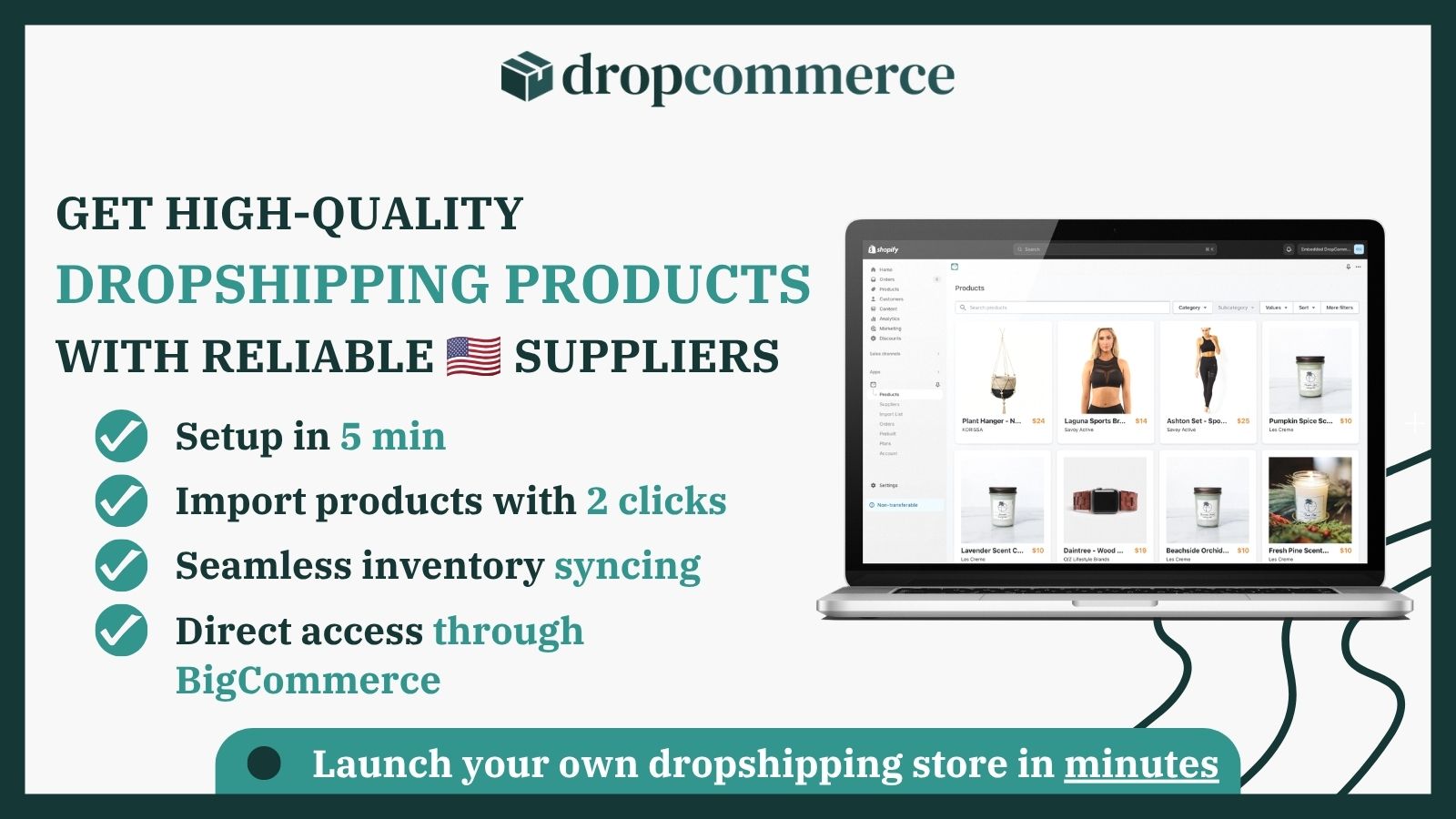
DropCommerce is the leading platform for connecting BigCommerce and Shopify stores with US and Canadian suppliers. You can install it directly from the BigCommerce App Marketplace, and if you're serious about fast shipping and quality products, this is where to start.
- Two to five day shipping from US and Canadian warehouses
- Pre-vetted suppliers with consistent quality standards
- No minimum order requirements, so you can start small
- Real-time inventory syncing to prevent overselling
- A curated catalog across home, beauty, pet, and lifestyle niches
- A dedicated North American support team
DropCommerce works particularly well for store owners who want to compete on customer experience rather than racing to the bottom on price. When products arrive in days rather than weeks, your reviews improve, refund requests fall, and customers come back to buy again. You can add the DropCommerce app to your BigCommerce store and start importing products in minutes.
Step 4: Import and Optimize Your Products

With a supplier app connected, you can start importing products into BigCommerce. Resist the urge to import everything. A focused, curated catalog around a clear niche is easier to market and looks far more trustworthy than a random assortment.
After importing, rewrite the product details. Supplier descriptions are generic and shared across hundreds of other stores. Your own titles and descriptions, written for your specific customer, will help you stand out and rank better in search.
If you're unsure which products to sell, our guide to finding winning dropshipping products shows how to spot real demand before you commit shelf space to an item.
Product Pages That Convert
Use high quality images on every listing. Clear, consistent photos make your store feel legitimate, and legitimacy is what convinces a first-time visitor to trust you with their card.
Write descriptions that answer real questions. What problem does the product solve? What is it made of? How is it used? Every doubt you remove is a sale you protect.
Show clear pricing and shipping details. When shoppers know exactly what they'll pay and when their order will arrive, they hesitate less and buy more often.
Step 5: Set Up Payments, Shipping, and Taxes
Now handle the money side of your store. In your BigCommerce settings, connect a payment gateway so you can collect sales. BigCommerce supports many providers, and offering more than one option can reduce abandoned carts at checkout.
Configure shipping to match what your supplier offers. If your supplier ships in two to five days, display that clearly. Honest, specific shipping promises build trust and cut down on customer complaints.
Set your tax settings based on where you operate and sell. BigCommerce can automate much of this, but confirm your rates are correct so you avoid unpleasant surprises down the road.
Pricing for Profit
Your prices need to cover product cost, app and platform fees, payment processing, and still leave real profit. A common starting point is marking products up two to three times the supplier cost, though the ideal number depends on your niche and competition.
Don't just guess at numbers. Knowing your margins early keeps you from accidentally selling at a loss. Our breakdown of dropshipping profit margins shows what healthy margins look like and how to protect them as you grow.
Keep in mind that the lowest price rarely wins. Customers pay for convenience, speed, and confidence. Deliver those, and you don't have to be the cheapest option on the internet.
Step 6: Launch and Test Your Store
Before you send any traffic, place a test order yourself. Walk through the full checkout as if you were a real customer. Confirm the payment processes, the order reaches your supplier, and confirmation emails look correct.
Check your store on mobile as well. Most ecommerce traffic now comes from phones, so a store that breaks on mobile will lose sales fast. BigCommerce themes are responsive, but you should still preview and fine-tune the mobile view.
Fix anything that feels clunky. Slow pages, confusing menus, and unclear buttons all cost you customers. A little polish before launch pays off the moment real visitors arrive.
Connect Your Custom Domain
A custom domain makes your store look established. Instead of a long default BigCommerce address, connect a short, memorable domain that matches your brand. You can buy one through BigCommerce or connect a domain you already own.
A clean domain also helps with marketing and word of mouth. It's easier to remember and share, and it signals that you're a real business rather than a weekend experiment.
Step 7: Drive Traffic and Fulfill Orders
A finished store with no visitors earns nothing. Once you're live, your focus shifts to marketing. Social media, content, email, and paid ads are all common ways to attract shoppers, and the right mix depends on your niche and budget.
When orders arrive, your supplier app handles most fulfillment automatically. Your job is to monitor orders, answer customer questions quickly, and step in when something goes wrong. Strong customer service turns one-time buyers into loyal repeat customers.
Keep testing and refining. Track which products sell, which pages convert, and where visitors drop off. Small, consistent improvements compound into meaningful growth over months.
A useful early habit is to pick just one or two marketing channels and get good at them before adding more. Spreading yourself across five platforms at once usually means doing all of them poorly. Master one traffic source, learn what your audience responds to, then expand.
Pay attention to your reviews and customer messages too. They tell you exactly what's working and what isn't, often faster than your analytics will. A single recurring complaint about shipping or product quality is a signal worth acting on immediately.
Common Mistakes to Avoid
Don't skip supplier research. A cheap product with slow shipping costs more in refunds and bad reviews than it ever saves. According to Shopify's ecommerce research, delivery experience strongly influences whether customers return, so this choice deserves real attention.
Don't neglect your product pages. Generic copy and stock photos make you blend in with every other store. A little effort here sets you apart from the crowd.
And don't expect overnight results. Building a profitable store takes testing, patience, and consistency. The sellers who stick with it and improve steadily are the ones who succeed.
Is BigCommerce Right for Your Store?
BigCommerce isn't the only option, so it helps to know where it fits best. It shines for sellers who expect to scale, manage larger catalogs, or sell across multiple channels from one place. The built-in features can save you money on apps as you grow.
That said, other platforms may suit different needs. If you want an open-source, self-hosted approach, our comparison of Shopify vs WooCommerce explores a different path and its trade-offs.
The good news is that the supplier side works the same everywhere. Whichever storefront you choose, connecting quality domestic suppliers is what actually drives customer satisfaction. The platform is the frame, but your suppliers are the engine.
Who BigCommerce Works Best For
BigCommerce is a strong fit for sellers who want room to grow without switching platforms later. If you're building for the long term, its scalability is a real benefit.
It also suits multi-channel sellers. If you plan to list on Amazon, eBay, or social platforms alongside your own store, managing it all from one dashboard saves time.
Finally, it works well for catalog-heavy stores. If you expect to carry many products or variants, BigCommerce handles that complexity smoothly.
Selling Across Multiple Channels
One of the strongest reasons to build a BigCommerce store is multi-channel selling. From a single dashboard you can list products on your own site, on marketplaces, and on social platforms, then manage orders and inventory in one place.
This matters for dropshippers because more channels mean more chances to be discovered. A product that struggles on your website might take off on a marketplace or through social commerce. Testing across channels lowers your risk and widens your reach.
The catch is that every channel raises the stakes on fulfillment. When you sell in more places, slow shipping and stockouts hurt you in more places too. That's another reason a reliable, fast-shipping supplier is the foundation everything else rests on.
Frequently Asked Questions About Dropshipping on BigCommerce
New store owners tend to ask the same questions, so let's clear them up.
Can You Dropship on BigCommerce?
Yes. BigCommerce supports dropshipping through apps in its marketplace that connect your store to suppliers and automate fulfillment. You build the storefront, install a supplier app, and orders route to your supplier automatically.
How Much Does It Cost to Start?
Your main costs are a BigCommerce plan, a domain, and any fees your supplier app charges. Many supplier platforms let you browse and import products for free and only charge once sales come in, which keeps your upfront investment low.
How Long Until You Make Your First Sale?
There's no fixed timeline. Some stores see a first sale within a couple of weeks using paid ads, while organic traffic often takes a few months to build. Your niche, marketing, and shipping speed all play a role, so treat the early weeks as a learning phase.
Do You Need a Business License?
Requirements vary by location, so check your local rules. Many small sellers start as sole proprietors and formalize their business as sales grow. Researching the basics early keeps you compliant as you scale.
Final Thoughts on This BigCommerce Dropshipping Setup Guide
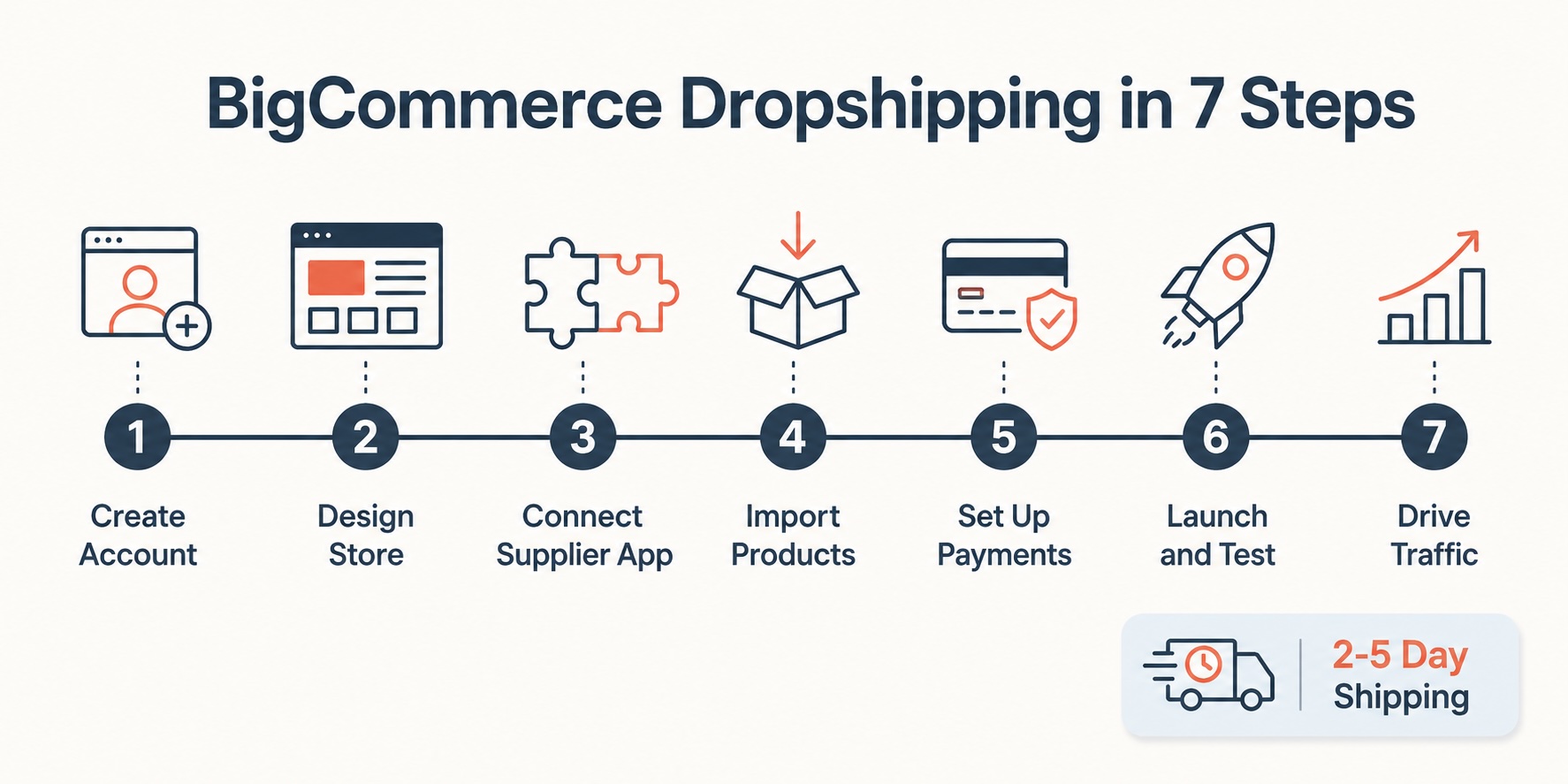
Following this BigCommerce dropshipping setup guide comes down to seven clear moves: create your account, design your store, connect a supplier app, import and optimize products, configure payments and shipping, launch and test, then drive traffic and fulfill orders. None of these steps require coding, and most can be done in a weekend.
The one decision that will shape your results more than any other is your supplier. Fast, reliable shipping from vetted suppliers keeps customers happy, reduces refunds, and builds the reputation that brings repeat sales. That's why starting with a domestic-focused platform like DropCommerce on the BigCommerce App Marketplace gives new BigCommerce stores such a strong head start.
Take it one step at a time. Build your store this weekend, connect quality suppliers, and place a test order. Once your foundation is solid, you can focus on the exciting part: growing a store that customers genuinely love to buy from.

.jpg)


